KeyShot: KeyShot Connect
Many companies create outstanding KeyShot visuals – and then lose track of them. They are exported, sent by email, copied into catalogs and presentations, and eventually can no longer be found. When the product changes, the hunt for every single copy begins.
KeyShot Connect solves this problem at the root: your scenes, renders and materials are kept in one central place, version-controlled and connected to the applications where they are used – from InDesign and Office to Canva and Figma. DOSCH DESIGN supports KeyShot Connect as a partner in the KeyShot Early Adopter Program and introduces it at your company.
● New from KeyShot
The platform that connects KeyShot content to all your applications.
● Early Adopter Partner
DOSCH DESIGN works with KeyShot on the rollout.
● One partner for the rollout
License, setup, master scenes and training.
The way it works today: many copies, no connection
Good 3D design today depends on collaboration, approvals and synchronization – across design, engineering, marketing, sales and agencies. Yet the results from KeyShot often remain isolated.
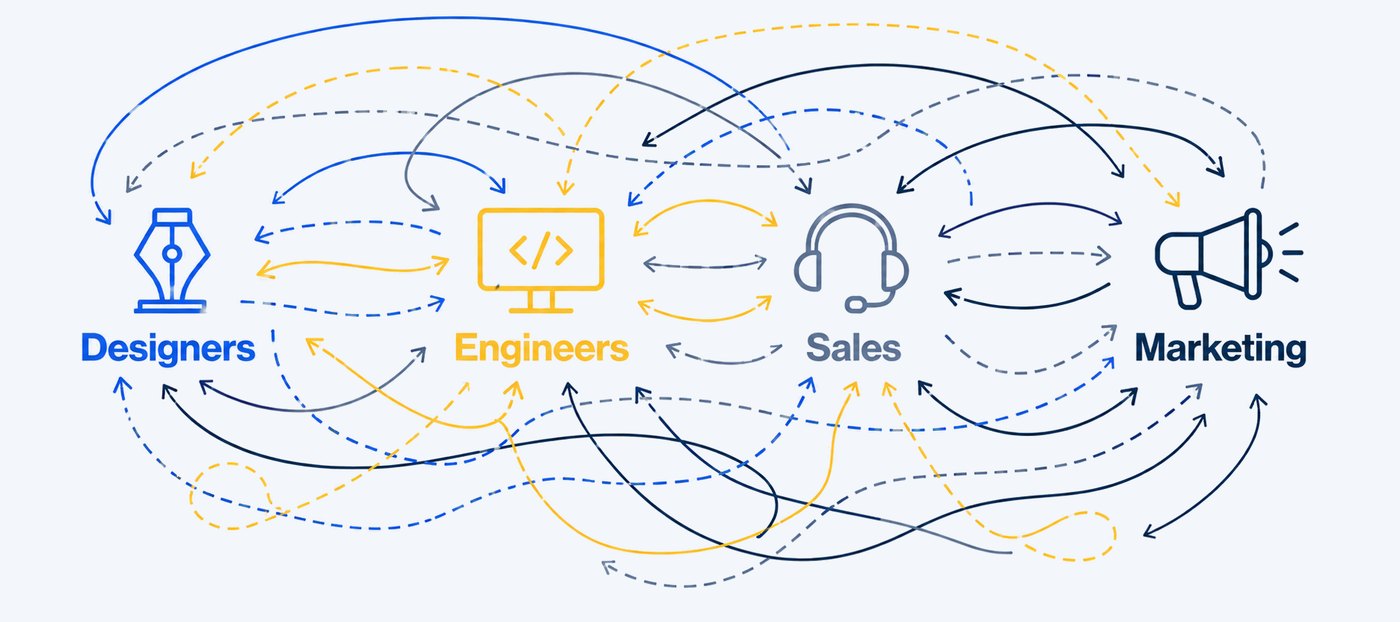
Today: every department works with its own copies. Source: KeyShot
Version chaos
Nobody knows for sure which image is current. Outdated views end up in catalogs, online shops and quotes.
Broken handoffs
From engineering to design to marketing, time and information are lost at every handoff.
Scattered files
Scenes, materials and renders sit on drives, in emails and in chats – hard to find, hard to maintain.
Slower time to market
Every product change triggers searching, re-exporting and replacing. That costs weeks.
Three core functions of KeyShot Connect
KeyShot Connect turns KeyShot Studio from a single-seat application into a connected platform. Three functions carry the concept:
Connected to your tools
KeyShot content flows directly into the tools your teams use every day: Adobe InDesign, Microsoft Office, Canva and Figma. A placed image stays linked to its source scene – when the scene changes, the image can be updated in place. No exports, no emails, no searching for the right file.
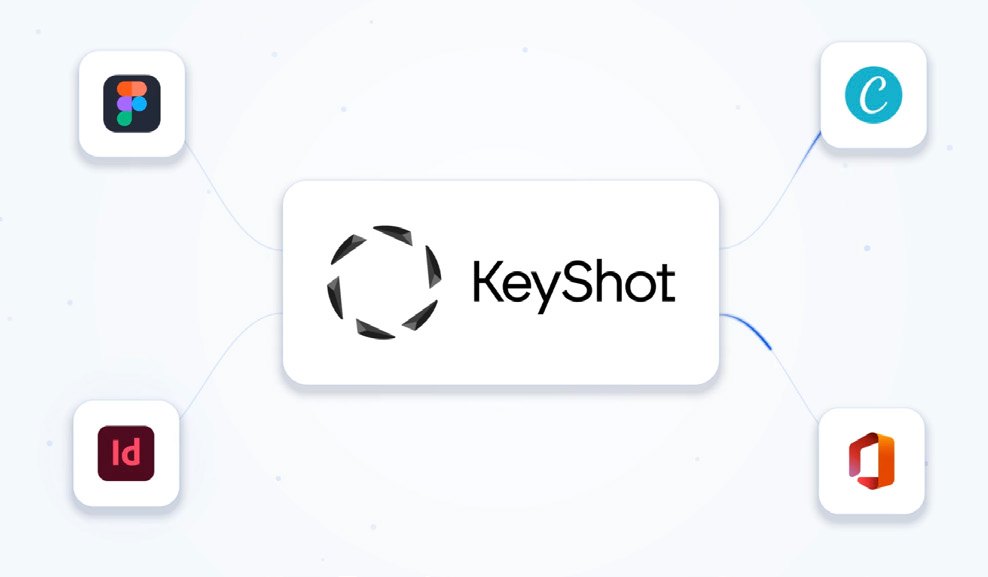
KeyShot Studio as the source – connected to layout, presentation and design. Source: KeyShot
Version control for 3D
Every change to a scene is recorded. You see who changed what and when, compare versions and return to an earlier state with a single click.
- ✓Unlimited version history
- ✓One-click rollback to any state
- ✓One source scene for all outputs
- ✓Comments directly on the 3D model
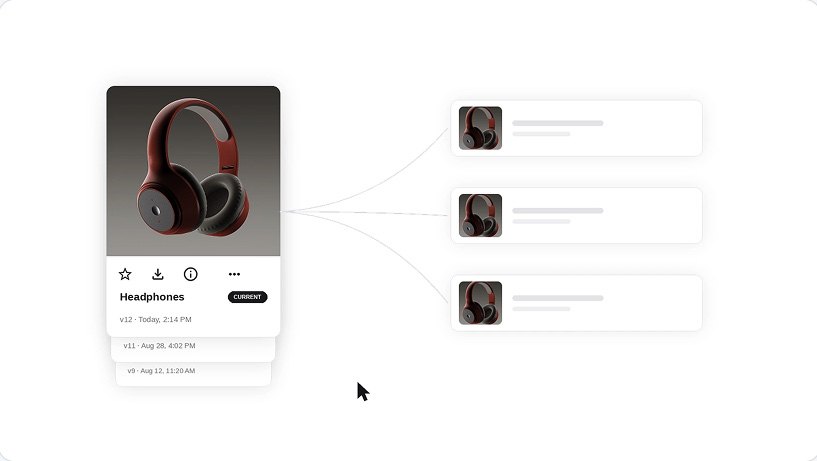
Versions and annotations on the scene. Source: KeyShot
Access, security and permissions
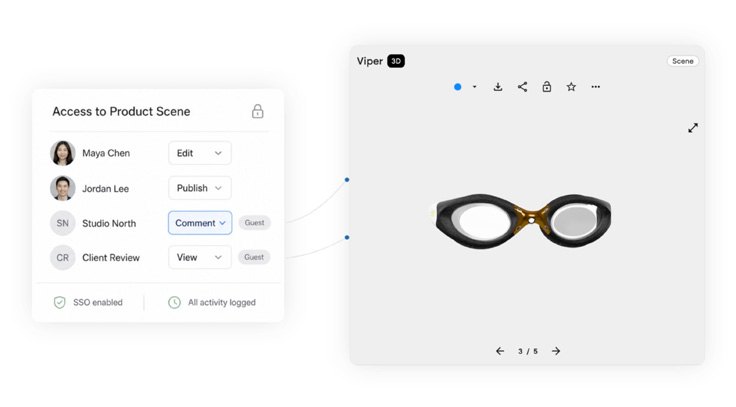
Review scenes in the browser – no installation. Source: KeyShot
You decide who can view, comment on and edit what. Colleagues, customers and agencies open scenes in the browser – no installation and no KeyShot license of their own.
- ✓Role-based access control (RBAC)
- ✓Single sign-on (SSO)
- ✓Guest access for external partners
- ✓Log of all access (audit log)
More features
3D viewer in the browser
View, rotate and review scenes – on any computer.
Tasks and approvals
Organize review steps and approvals directly on the scene.
File preview
Previews for scenes, renders and materials.
Folders and collections
Organize content by product, project or campaign.
Comments in 3D
Annotations exactly where they matter.
Linked assets
See everywhere an image is being used.
Shared libraries
Materials, environments and textures in sync for everyone.
Dependencies
Track which files belong together.
Where KeyShot Connect helps day to day
- ✓Design-to-marketing handoff: Marketing accesses approved visuals instead of waiting for exports.
- ✓Up-to-date sales and marketing materials: Catalogs, data sheets and presentations show the current product.
- ✓Review and approval of 3D content: Comment and approve in the browser – including customers and agencies.
- ✓Shared materials: All teams use the same materials, colors and environments.
- ✓Fewer exports and copies: One source instead of many files in emails, drives and chats.
Who KeyShot Connect is made for
KeyShot Connect is designed for companies in which several teams and external partners work with the same product visuals:
- ✓Design and engineering – create and maintain the scenes in KeyShot Studio.
- ✓Marketing and sales – use current visuals in catalogs, online shops, presentations and quotes.
- ✓Agencies and partners – review, comment and contribute without a KeyShot license of their own.
- ✓Management and IT – keep access, permissions and security under control.
What DOSCH DESIGN does for you
A platform alone does not change a workflow. What matters is what goes into it and how your teams work with it. As a Certified KeyShot Studio Master, we introduce KeyShot Connect at your company – step by step:
Advise
We look at your workflow, your teams and the benefits of KeyShot Connect for your company.
Set up
Structure, roles, permissions and shared libraries – tailored to your organization.
Prepare scenes
We turn your KeyShot scenes into a clean, reusable form: the KeyShot master scene.
Train teams
Your team learns KeyShot Studio and KeyShot Connect – hands-on, with your own products.
Related services: DOSCH Key-Optimize for preparing your scenes, KeyShot Online Training for your team and our 3D services for consulting, modeling and rendering.
Availability and terms
| Availability | Available now through DOSCH DESIGN (Early Access) |
| License model | Annual subscription |
| Price | Individual quote – tailored to your teams and your requirements |
| Rollout | Consulting, setup, scene preparation and training by DOSCH DESIGN |
| Access for reviewers | In the browser, no installation and no KeyShot license required |
Qualifications
DOSCH DESIGN has worked with KeyShot for many years and holds multiple KeyShot certifications – Certified KeyShot Studio Master, KeyShot Studio Certified Professional, KeyShot Material Specialist and KeyShot Training Partner.
Frequently asked questions
What is KeyShot Connect?
KeyShot Connect is a KeyShot platform that links KeyShot Studio to the tools, teams and workflows where your product visuals and 3D content are used. Scenes, renders and materials are stored centrally, version-controlled and can be placed as linked assets in applications such as InDesign, Office, Canva and Figma.
Do colleagues or agencies need a KeyShot license?
No. Anyone who only needs to view, comment on or approve scenes works directly in the browser – no installation and no KeyShot license required. Guest access is also available. Anyone who edits and renders scenes continues to use KeyShot Studio.
Which tools does KeyShot Connect work with?
KeyShot Connect links KeyShot Studio and brings your content into Adobe InDesign, Microsoft Office, Canva and Figma. In our first conversation we clarify which connections matter most for your workflow.
Which companies benefit from KeyShot Connect?
Companies in which several departments and external partners work with KeyShot content – for example design, engineering, marketing, sales and agencies. The more places use the same product visuals, the greater the benefit.
How much does KeyShot Connect cost?
KeyShot Connect is offered as an annual subscription. We will provide the price in an individual quote tailored to your teams and your requirements.
Can I see KeyShot Connect before deciding?
Yes. In an online presentation we show you KeyShot Connect based on your own workflow and answer your questions. Just get in touch.

See KeyShot Connect in your own workflow.
In an online presentation we show you what KeyShot Connect changes for your teams and prepare an individual quote for you.
Request KeyShot ConnectBook an online presentationOr contact us directly: +49 9391 507090-0 · info@doschdesign.com
KeyShot and KeyShot Connect are trademarks of KeyShot (Luxion Inc.). User interface images: KeyShot. Features as stated by KeyShot, as of November 2026.